You are riding from Boston to Washington with a stop in New York, you have a hotel booked for each night and a couple of reservations along the way. The train part is one of the easier pieces to carry, because Amtrak’s eTicket is already a PDF with a barcode.
Where to find your Amtrak eTicket, and whether to print it
- Open the receipt email Amtrak sent when you bought: the eTicket is a PDF attached to it.
- Or open the Amtrak app, where you can retrieve the same eTicket.
- Print the PDF before you reach the station if you like, or open the eTicket on your phone and show the barcode to the conductor.
Printing is optional.
Bought tickets for the whole party? Send the confirmation email on to Travel Wallet, and each eTicket reaches the passenger whose name it carries.
Adding your Amtrak eTicket to Apple Wallet or Google Wallet
Apple Wallet, yes. Amtrak’s mobile app page lists “Send your eTicket to Apple Wallet” among the app’s features. The same page does not say anything about adding an eTicket to Google Wallet, so check the Amtrak app on your Android phone.
Whatever you use, Amtrak says to open the eTicket on your phone and show the barcode to the conductor.
What Amtrak sends
A few other cases from Amtrak’s help pages:
- At a staffed counter or a kiosk, the eTicket is printed for you at the end of the purchase.
- One eTicket covers all the legs of a trip, and one eTicket can be used for a group of up to 8 passengers under the same reservation.
- Group tickets, and fares paid on the train, do not receive an eTicket.
- Bookings from travel agencies and corporate offices get paper value tickets, which must be used to board.
- After a change, the eTicket is updated, and printing a new copy is recommended but not required.
Getting the eTicket into Travel Wallet
Your receipt email is the easiest source. Forward it to your trip’s address, and the app reads the PDF attached to it: the route, the train number, the date and the local time, the car and seat if they are shown, and the reservation reference.
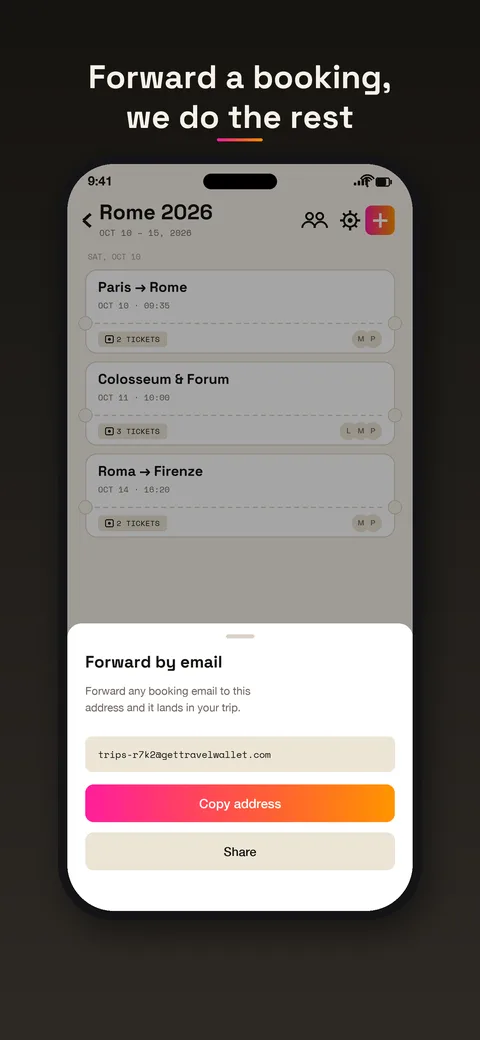
If you already have the PDF open in another app, share it from there into the trip. For a ticket printed at a kiosk, take a photo, and the app reads that too.
A trip made of legs
Rail trips tend to be a chain: one leg to New York, a night in a hotel, another leg south. In Travel Wallet each leg becomes a ticket on its day, and the hotel sits between them. Open the trip in the morning and you see where you are in the chain.
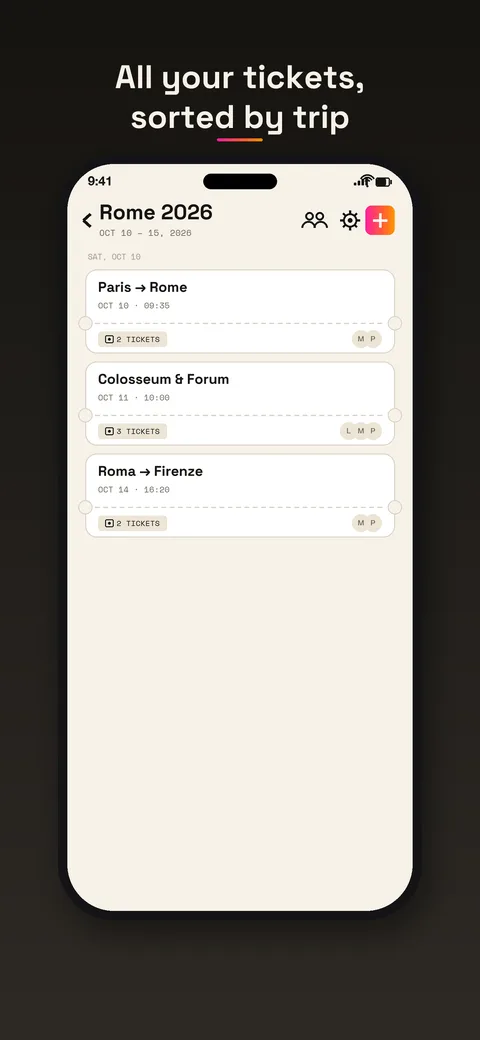
Tickets for the same journey stay together on one card. Anything without a date goes to the end of the list.
When you travel as a group
Amtrak lets one eTicket cover up to eight people on a reservation, which is neat for a family. The catch is that whoever holds the eTicket holds everyone’s ride. In Travel Wallet, you invite the rest of the crew with a link, and every member sees the trip and its tickets, so more than one phone has the eTicket and the plan. When a booking holds one ticket per traveler, each goes to the person whose name is printed on it, and the children’s stay on a parent’s phone. For the ride itself, keep the eTicket available the way Amtrak describes.
At the platform
Amtrak says to open the eTicket on your mobile device and show the barcode to the conductor. So the safe habit is simple: have the eTicket itself ready, from the Amtrak app or the PDF, when the conductor comes through. Travel Wallet shows the code of a ticket full screen at full brightness, but that does not make it the thing Amtrak asks for, so keep the real eTicket within reach as well.
In the app, tickets are stored encrypted on your phone, so the plan opens in the places with no coverage. A reminder arrives before departure, and the ticket exports to your calendar.
What it will not do
Travel Wallet does not sell Amtrak tickets, does not change reservations and does not show live train status. For changes, Amtrak’s own channels are the way. If you change a reservation, forward the updated email or share the new PDF, and remove the old ticket from your trip.
Paper value tickets are a special case. Amtrak says they must be used to board, so for those, carry the paper. A photo in your trip is still handy as a record.
For a more general view, the guide to offline tickets and QR codes shows what happens without a signal.
Free to start
The app is free to start on iPhone and Android, and a guest session opens by itself. Your first trip is free, with no ticket limit. Any new trip after that needs Premium. Premium is for people who ride a lot. Read about it on the pricing page.